API Standards
Introduction
API standards ensure consistency, scalability, and ease of use for developers consuming your APIs. This document provides guidelines for designing and structuring RESTful and Laravel APIs.
RESTful API Structure Documentation
This documentation provides guidelines and best practices for structuring a RESTful API in your project. A well-structured API promotes consistency, scalability, and ease of use for developers consuming your API. Follow the guidelines below to structure your RESTful API effectively:
API Design Principles
- Use Standard HTTP Methods: Design your API endpoints around standard HTTP methods such as GET, POST, PUT, PATCH, and DELETE. Map each method to the corresponding CRUD (Create, Read, Update, Delete) operations.
- Resource-Oriented Design: Structure your API around resources. A resource is an object or concept that can be uniquely identified, such as "users," "products," or "orders." Use nouns to name your endpoints and make them represent resources.
- Use Plural Nouns: Use plural nouns in your endpoint URLs to represent collections of resources. For example, /users represents a collection of users.
- Versioning: Consider versioning your API to ensure backward compatibility as your API evolves. Include the version number in the URL, such as /v1/users.
- Use Proper Status Codes: Return appropriate HTTP status codes to indicate the success or failure of a request. For example, use 200 for successful GET requests, 201 for successful POST requests, and 404 for resources not found.
- Error Handling: Define a consistent error handling mechanism to provide meaningful error messages and error codes to API consumers. Include error details in the response body and use appropriate HTTP status codes for different error scenarios.
API Structure
Here is a suggested structure for organizing your API endpoints:
- Authentication and Authorization: Include endpoints for user authentication and authorization, such as /login and /register. These endpoints typically handle user authentication and provide access tokens or session cookies for subsequent requests.
-
Resources: Define endpoints for each resource in your system. Use plural nouns to represent collections of resources and singular nouns for specific resource instances. For example:
- /users: Endpoint for managing user resources.
- /users/{id}: Endpoint for managing a specific user by their unique identifier.
-
Nested Resources: If there are relationships between resources, consider using nested endpoints to represent those relationships. For example:
- /users/{userId}/posts: Endpoint for retrieving posts associated with a specific user.
- /posts/{postId}/comments: Endpoint for retrieving comments associated with a specific post.
-
Pagination: If your API returns large collections of resources, consider implementing pagination to improve performance. Include query parameters like page and limit to control the number of results returned.
- Filters and Sorting: Allow API consumers to filter and sort resources based on specific criteria. Use query parameters to specify filters and sorting options.
- Endpoint Naming Conventions: Use consistent and intuitive naming conventions for your endpoints. Aim for clarity and simplicity to make it easier for developers to understand and use your API.
- Request and Response Formats: Clearly document the request and response formats for each endpoint, including the expected data types, headers, and any required or optional parameters.
- Error Handling: Define a standardized format for error responses, including error codes, error messages, and additional error details if necessary.
- Versioning: If you plan to introduce breaking changes to your API in the future, consider implementing versioning strategies. This allows API consumers to migrate to newer versions of the API at their own pace while maintaining backward compatibility.
- Documentation: Provide comprehensive documentation that describes each endpoint, its purpose, required parameters, and expected responses. Include example requests and responses to illustrate how to interact with your API.
Laravel API Structure Documentation
This documentation provides guidelines and best practices for structuring a Laravel API in your project. Laravel is a popular PHP framework that offers powerful tools and features for building robust and scalable APIs. Follow the guidelines below to structure your Laravel API effectively:
API Design Principles
- Use RESTful Principles: Design your API endpoints following RESTful principles. Use standard HTTP methods (GET, POST, PUT, PATCH, DELETE) to perform CRUD operations on resources.
- Resource-Oriented Design: Structure your API around resources. Each endpoint should represent a resource, and the URL should use plural nouns to represent collections of resources.
- Use Proper HTTP Status Codes: Return appropriate HTTP status codes to indicate the success or failure of a request. Use 200 for successful responses, 201 for resource creation, 204 for successful but empty responses, and appropriate error codes (e.g., 400, 404, 500) for error scenarios.
- Implement Pagination: If your API returns large collections of resources, implement pagination to improve performance. Include query parameters (e.g., page, limit) to control the number of results returned.
- Handle Errors and Exceptions: Implement proper error handling and exception management to provide meaningful error responses to API consumers. Use Laravel's exception handling mechanisms to catch and handle exceptions gracefully.
- Authentication and Authorization: Implement authentication and authorization mechanisms to secure your API endpoints. Use Laravel's built-in authentication features (e.g., Laravel Passport, JWT) or third-party libraries to handle authentication and access control.
API Structure
Here is a suggested structure for organizing your Laravel API:
- Routes: Define your API routes in the routes/api.php file. Use Laravel's route definitions to map URLs to controller methods. Organize your routes based on resources and their corresponding controllers.
- Controllers: Create controllers to handle each resource of your API. Use resource-specific controllers to group related functionality. Follow Laravel's naming conventions for controllers and methods.
- Models: Define models that represent your database tables or collections. Models allow you to interact with the database and perform operations like retrieving, creating, updating, and deleting records.
- Requests: Create request classes to handle request validation. Use Laravel's form request validation or custom request classes to validate incoming requests and ensure the data is valid before processing.
- Transformers: Implement transformers to transform your model data into a standardized format (e.g., JSON) for API responses. Transformers allow you to control the structure and presentation of your API data.
- Services or Repositories: Use services or repositories to encapsulate complex business logic and keep your controllers lean. Services handle the main business logic of your application, while repositories interact with the database or external data sources.
- Middleware: Implement middleware to handle cross-cutting concerns such as authentication, authorization, rate limiting, or request/response modification. Laravel provides middleware that you can use out of the box or create custom middleware as per your requirements.
- Response Formatting: Use Laravel's response helpers or create custom response classes to format your API responses consistently. This ensures that API consumers receive responses in a standardized format.
- Validation: Leverage Laravel's validation features to validate incoming data. Use validation rules to ensure the integrity and correctness of the data provided by API consumers.
- Error Handling: Customize Laravel's exception handling to provide meaningful error responses. Create custom exception classes for specific types of errors and define how they should be transformed into API responses.
- Documentation: Provide comprehensive documentation that describes each endpoint, its purpose, required parameters, and expected responses. Include examples of request and response payloads to assist API consumers in using your API effectively.
Online References
Simplify API Data Handling in React with an Abstraction Layer 1
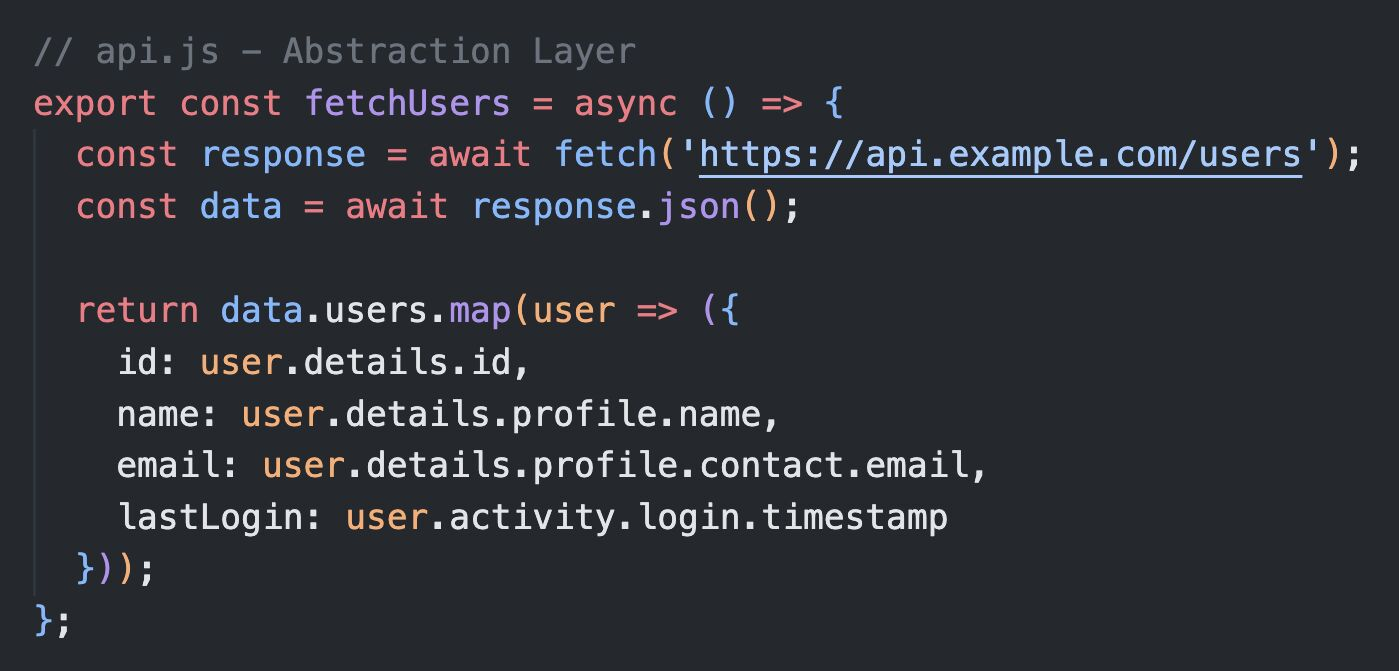
When working with complex API data in React, deeply nested JSON can quickly clutter your components. Instead of passing raw, nested data around, why not simplify it with an abstraction layer?
The Problem:
APIs often return complex, deeply nested data. Passing these objects directly to your UI leads to-
- Duplicated Logic: Repeating the same data-parsing logic in multiple components.
- Messy Components: UI components cluttered with data transformation code.
- Maintenance Headache: API structure changes break multiple components.
The Solution:
Create an abstraction layer between the API and the UI. This middle layer processes and simplifies the data before it reaches your components.
- How It Works:
- API Layer: Fetch data as usual.
- Middle Layer: Transform the nested data into a cleaner format.
- UI Layer: Components receive clean, usable data.
- Why It Works:
- Cleaner Components: UI only focuses on displaying data, not transforming it.
- Easier Maintenance: Changes in API structure are isolated to the abstraction layer.
- Flexibility: Swapping or modifying APIs doesn’t affect the UI.
It’s a small investment in abstraction that pays off in cleaner, more maintainable code.